Model & geometry
Model series, model year, body shape, proportions, perspective and silhouette.
Seedream 5.5 and BytePlus Lumina for consistent, controlled vehicle image editing – from background variations to reusable marketing production.
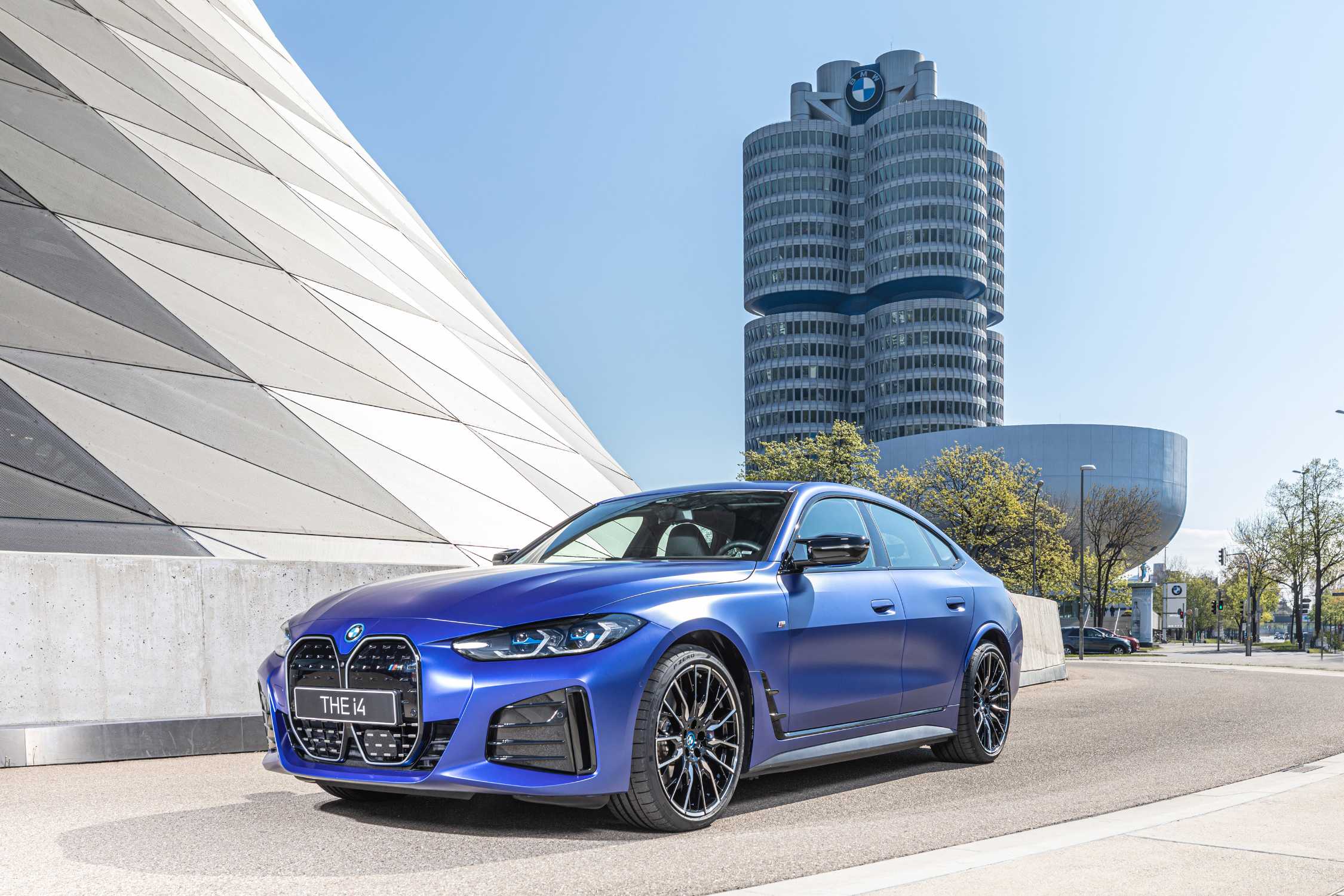 Reference photo unavailableBMW i4 M50 at BMW Group headquarters in MunichOpen original source ↗
BMW i4 M50 · Reference photograph, not an AI test result. Source: BMW Group PressClub · P90460314
¹ Model-side maximums according to ModelArk documentation; feature availability in Lumina may differ.
A compelling image alone is not enough in automotive marketing. The visual product must match the approved vehicle variant, through every edit and across every channel.
Model series, model year, body shape, proportions, perspective and silhouette.
Approved paint shade, metallic or matte finish, surfaces and interior materials.
Wheels, tyres, lights, grille, mirrors, trim and body components.
BMW emblem, model and M badging, accurate typography and branding.
The international ModelArk documentation describes the following model-side capabilities. Their suitability for specific BMW vehicles needs to be validated in the PoC.
Improved consistency of the subject, composition and unchanged regions across consecutive edits.
Transparent images from text or image references, useful for independent asset layers.
One base image and up to 99 layers; individual elements can be provided for compositing.
Up to ten reference images per generation request, for example to constrain specific vehicle details.
Explicit change and preservation instructions, and editing of existing images.
Scene, lighting and material appearance can blend more naturally; product details still require verification.
Browse published reference images for different campaign settings. These are independent images, not edits of a single source asset. Configuration, viewpoint and paint may differ.
Each reference links to its original published source.
For creative reference only. To test consistency, use the same approved original in Lumina and compare it with the output using the local image review tool.
MA-BMW.com (BMW configurator reference) ↗Start with one approved vehicle image and one clearly defined change. The goal is not the most attractive individual image, but a reproducible result.
Use a publicly released or explicitly test-approved BMW image. Record the model, model year, variant, paint, equipment and asset ID.
Sign in to your evaluation account. Open Canvas, Canvas Pro or image editing, depending on the available interface.
Select Seedream 5.5 if available in your account. Upload the original as an image reference; for multi-turn tests, preferably use RGB input and an opaque background.
Paste the prompt from Use Case 01. If mask editing is available, select only the permitted background region. Verify which model node is actually executed.
Save the prompt, model version, parameters, original and result. Inspect critical vehicle details and record any deviations.
Test background replacement first, then ten editing rounds, followed by reuse of the transparent original layer.
One image is enough to begin. Additional reference images should show exactly the same vehicle configuration. Do not mix model years, trim lines or colours.
Approved three-quarter view at original resolution.
Front, side and rear; ideally the same configuration.
Lights, wheels, grille, badges and relevant material details.
Approved transparent PNG or CGI render with alpha; separate shadow and reflection layers if needed.
The first three tests focus on the core requirement. The remaining three extend the evaluation to channels, interiors and reusable workflows. Copy each prompt and always use an approved source asset.
Reference photo unavailableBMW i4 M50 at BMW Group headquarters in MunichOpen original source ↗REFERENCEPlace a vehicle in new campaign environments without changing its product variant.
Replace only the background with a contemporary architectural environment in Munich. Use the original vehicle as the authoritative reference. Preserve the vehicle model, body geometry, paint colour, material finish, wheels, lights, grille, mirrors, badges, proportions and camera angle. Do not regenerate, redesign or recolour the vehicle. Modify only the background and, where necessary, the ground contact shadow outside the protected vehicle layer.
Determine whether product details gradually drift after consecutive edits.
Apply only the specified change to the background or layout. The original vehicle is the authoritative reference: preserve its model, body geometry, paint colour, material finish, wheels, lights, grille, mirrors, brand markings and camera angle. No redesign, no equipment changes and no unintended visual drift. Leave every region not authorised for editing unchanged.
For each round, use the common preservation block plus the specific change instruction. Group A uses the preceding output; Group B re-anchors each edit to the approved original. For a fair comparison, record identical intended edits, model versions and resolutions.
White-background reference, not a transparent PNG. Use an approved RGBA original for the test.
Use an independent vehicle layer across several scenes and campaign formats.
Isolate the original vehicle and remove only the background. Output the vehicle as a transparent RGBA PNG if the output mode supports it. Preserve the exact silhouette, paint colour, reflections, window details, wheels, lights, mirrors and badges. Do not reconstruct, beautify, simplify or redesign any vehicle component.
 Reference photo unavailableBMW i4 M50 in modern architectureOpen original source ↗
Adapt one approved campaign asset to 16:9, 4:5, 1:1 and 9:16.
Adapt the original campaign image to a vertical 9:16 format. Extend only the surrounding environment to fit the new canvas. Keep the entire vehicle visible and preserve its exact model, design, colour, materials, proportions and configuration. Do not stretch, crop or regenerate the vehicle. Leave sufficient negative space above it for campaign messaging to be placed separately.
Change the environment outside the windows without misrepresenting the interior equipment.
Use the original vehicle interior image as the authoritative product reference. Change only the environment visible through the vehicle windows to an Alpine landscape. Preserve the exact interior configuration, leather colour, surface texture, stitching, dashboard, steering wheel, displays and decorative trim. Do not modify or reinterpret any interior material or component.
Turn validated individual tests into a reusable, documented workflow.
Create exactly one campaign background scene for [MARKET / SEASON / THEME] in [ASPECT RATIO]. Use the vehicle reference only for camera, scale and ground perspective; do not generate a new vehicle in the background. Leave sufficient space for the approved original vehicle and campaign messaging. The protected vehicle layer will be composited separately without modification.
For professional, repeatable production, separate approved vehicle assets from AI-generated creative elements. This is a proposed target workflow, not a claim of an already implemented BMW integration.
No generative recalculation
Background & creative elements
Original layer + new environment + approval
Proposed workflow · not a verified integration or model test.
Approved originals, variants, paint and material codes, view and asset ID. Keep master assets read-only.
Use an original CGI render or transparent PNG as a separate, non-regenerated foreground layer.
Generate or edit only the background, environment, layout and approved creative elements.
Combine creative elements and the protected original in a controlled workflow. If genuine layer locking is unavailable, composite deterministically outside the generative edit.
Reference comparison, critical product details, colour and material review, brand and product approval.
Export by channel and associate the result with the asset ID, model version, prompt, parameters and approval status.
Controlled adjustments to lighting, reflections and shadows may be allowed. Model, paint properties, material and equipment must remain accurate. Suitable for realistic scene integration.
Reuse the untouched original layer at identical coordinates and resolution without generative recalculation. Compare the fully opaque protected region pixel by pixel. Treat semi-transparency, resampling, colour management and compression separately.
Compare at the same view, resolution and – where possible – generation settings. The criteria below are proposed PoC acceptance criteria and should be agreed with the responsible BMW teams.
| Criterion | Proposed acceptance criterion | Review method |
|---|---|---|
| Model & model year | No incorrect model series or variant. | Original reference, product review |
| Geometry & perspective | No unintended changes. | Overlay / contour comparison |
| Equipment & brand markings | No incorrect wheels, lights, badges or trim details. | Magnified detail comparison |
| Colour & materials | Approved paint and material appearance; lighting according to selected mode. | Colour management, material reference, visual approval |
| Multi-turn consistency | No unacceptable changes after rounds 1, 5 and 10. | Compare to the untouched original |
| Protected layer (mode B) | Fully opaque protected pixels unchanged at identical geometry. | Lossless files, registered masked pixel comparison |
| Scene quality | Plausible perspective, shadow, ground contact and lighting. | Visual quality review |
| Productivity | Track time, accepted outputs, attempts and cost. | Compare with existing workflow |
Phase 1: select 2–3 approved vehicle variants, one original view per variant and three backgrounds; additionally run the ten rounds in Use Case 02 for at least one variant. Phase 2: compare two independent workflows (visual consistency vs protected original layer). Optionally benchmark Seedream 5.0 Pro and 5.5 under comparable conditions. Record elapsed time, attempts, technical deviations, approval rate and cost per accepted asset.
Optionally select an original and an output from your device. The files stay in your browser; they are not sent to a server. Move the slider to reveal the output over the original. Only aligned images support meaningful comparison.
Image dimensions differ. Use the same resolution and alignment for registered comparison.
Select an approved original image and its corresponding Lumina output.
Only locally selected original and output images are compared. This tool is a visual overlay, not an automated pixel-accuracy or approval check. Do not use as evidence if alignment or resolution differs.
Set the status for each criterion. Add the asset ID, actual model and observations. The record is stored only in your browser; export as CSV for internal review.
Consult the official product documentation to verify the model and platform capabilities available to your account.
Technical basis: international BytePlus documentation (as of 27 November 2026) and the described Seedream 5.5 product capabilities. International model limits and features actually available in the account prevail; this guide does not promise 4K output or immutable model-generated pixels.


